

Why UX Audits Matter More Than Features
Many digital products fail not because they lack features, but because users struggle to use them effectively. A product may include advanced functionality, integrations, and modern design, yet still fail to deliver value if users cannot complete tasks easily.
This is where a structured UX audit framework becomes essential. It helps product teams evaluate how users interact with a product and identify real usability issues instead of relying on assumptions.
Before starting a full audit, review a structured approach like UX Audit Checklist for Startups.
You can also explore the UX Process Breakdown for SaaS Products to understand the overall UX workflow.
In many real-world audits, the most critical issues are not obvious design flaws but small interaction gaps that go unnoticed. These minor friction points often have the biggest impact on user behavior and conversion rates.
From My Experience
In one of my recent UX audit projects, I worked with a product where users were consistently dropping off during a key conversion step. The team initially believed it was a marketing issue. However, after conducting a structured UX audit, we discovered that the real problem was a confusing interaction flow and unclear call-to-action placement.
By simplifying the flow, improving visual hierarchy, and reducing unnecessary steps, we were able to significantly improve task completion rates. This experience reinforced that UX audits are not just about identifying issues but about uncovering hidden friction that directly impacts business performance.
What Is a UX Audit Framework?
A UX audit framework is a structured method used to evaluate how effectively a digital product supports user goals. It focuses on identifying usability issues, friction points, and inconsistencies in the user experience.
Unlike a redesign, a UX audit does not rebuild the product. Instead, it analyzes the current experience and provides actionable recommendations.
- Usability evaluation
- Information architecture review
- Navigation analysis
- User flow mapping
- Accessibility assessment
- Performance evaluation
For accessibility best practices, refer to WCAG guidelines.
Why UX Audits Are Critical for Business Growth
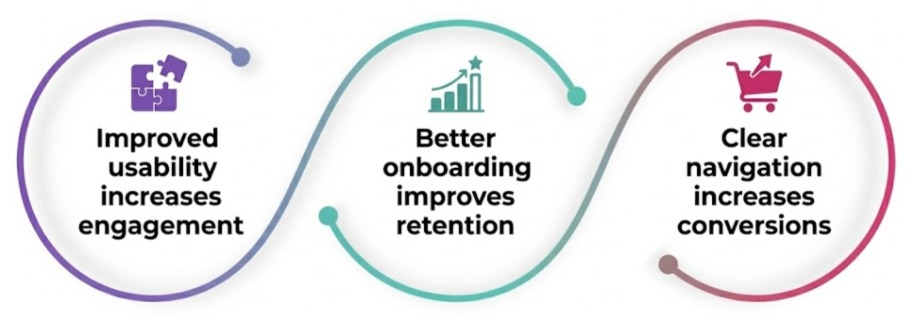
UX audits directly impact business performance. When users face friction, they abandon tasks. As a result, conversion rates decrease and customer satisfaction drops.
To understand common usability issues, read Common UX Mistakes Startups Make.
When Should You Conduct a UX Audit?
- When engagement declines
- When conversion rates drop
- After major feature updates
- When users report usability issues
- During product scaling
Regular audits help maintain a consistent user experience as your product evolves.
Core Components of a UX Audit Framework
Information Architecture
Defines how content and features are organized. Poor structure leads to confusion.
Navigation Clarity
Users should always know where they are and what to do next.
User Flow Analysis
Analyzes how users complete tasks and identifies drop-off points.
Accessibility Review
Ensures usability for all users and improves inclusivity.
Performance Optimization
Fast and responsive interfaces improve user satisfaction.
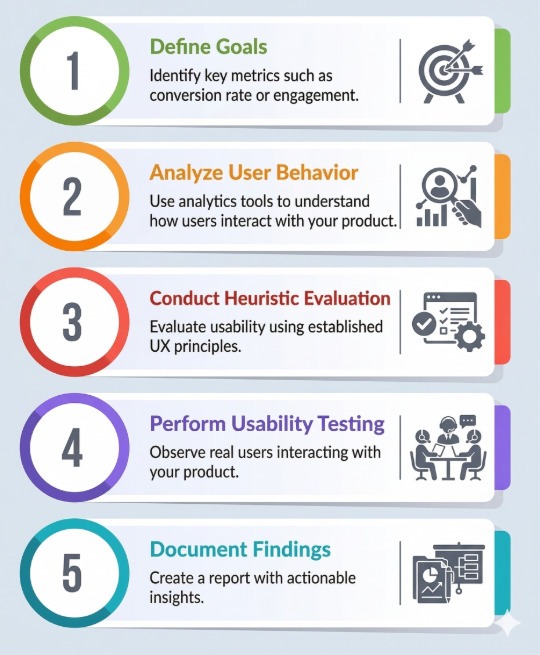
UX Audit Process: Step-by-Step

Real Example: UX Audit in a SaaS Dashboard
In a SaaS dashboard, users struggled to find key features. During the UX audit, issues such as cluttered navigation and hidden actions were identified.
- Simplified navigation
- Highlighted key actions
- Optimized layout
As a result, task completion improved significantly.
UX Audit vs UX Research
A UX audit evaluates existing interfaces, while UX research focuses on understanding user behavior and needs.
Learn more about research here: UX Research Methods.
Quick UX Audit Checklist
- Is navigation clear?
- Are actions visible?
- Is onboarding simple?
- Is content readable?
- Is performance optimized?
Explore full checklist: UX Audit Checklist
Common UX Audit Mistakes
- Relying on assumptions
- Ignoring user data
- Focusing only on visuals
- Not prioritizing issues
Tools Used in UX Audits
- Hotjar – user behavior insights
- Maze – usability testing
- Google Analytics – performance tracking
Explore more tools: UX Tools and Process
Advanced UX Audit Insights
Advanced teams combine qualitative and quantitative data to improve UX continuously. This approach ensures long-term product success.
The Future of UX Audits
UX audits are evolving with AI and real-time analytics. Continuous evaluation is becoming standard for modern digital products.
Real UX Problems Identified During Audits
- Problem: Users abandoning tasks midway due to unclear next steps
- Fix: Improved flow clarity and highlighted primary actions
- Problem: Overloaded dashboards making it difficult to focus
- Fix: Simplified layout and prioritized key information
- Problem: Inconsistent navigation across sections
- Fix: Standardized navigation patterns and structure
Key Insight
A UX audit does not just identify usability issues; it reveals how small design decisions impact user behavior. Often, the biggest improvements come from fixing simple friction points rather than redesigning the entire product.
Conclusion
A UX audit framework helps identify usability gaps and improve product performance. It enables teams to make data-driven decisions and create better user experiences.