

Why Accessibility Is a Business Strategy, Not Just Compliance
Accessibility in digital products is often misunderstood as a compliance requirement rather than a business opportunity. Many organizations treat accessibility as a final checklist item before launch. However, in reality, accessibility is one of the most powerful drivers of usability, engagement, and long-term product success.
In today’s digital ecosystem, users interact with products across different devices, environments, and abilities. Some users may have permanent disabilities, while others may experience temporary or situational limitations such as poor lighting, slow internet, or limited device capabilities. Therefore, designing inclusive experiences ensures that products remain usable for a broader audience.
A strong accessibility UX strategy improves not only inclusivity but also overall usability. When interfaces are clear, readable, and easy to navigate, all users benefit. As a result, accessibility directly contributes to better user experience and improved business performance.
Before implementing accessibility improvements, it is important to identify existing usability gaps. A structured UX audit framework helps evaluate current issues. You can also follow a UX audit checklist to quickly identify accessibility challenges in your product.
In real product environments, accessibility is often treated as a compliance requirement. However, when implemented correctly, it directly improves usability, increases engagement, and contributes to measurable business outcomes.
From My Experience
In one of my projects, we noticed that users were dropping off during form submissions. Initially, the issue was considered a usability problem. However, after reviewing the interface, we found that poor contrast and unclear labels were making the form difficult to understand.
By improving readability, simplifying labels, and enhancing visual clarity, we saw a noticeable increase in form completion rates. This showed that accessibility improvements can directly impact user behavior and business performance.
This experience reinforced that accessibility is not just about inclusivity—it is a key driver of usability and conversions.
Understanding Accessibility in UX Design
Accessibility in UX design refers to creating digital products that can be used by people with diverse abilities. This includes users with visual, auditory, motor, and cognitive impairments. However, accessibility is not limited to these groups. It also improves usability for all users.
For example, a user in a noisy environment benefits from captions, while a user in bright sunlight benefits from high contrast. Similarly, simple navigation helps both new users and experienced professionals.
Accessibility is guided by global standards such as WCAG guidelines, which define principles for inclusive design. These principles focus on making content perceivable, operable, understandable, and robust.
By following these standards, organizations can create products that are both inclusive and efficient.
Why Accessibility Directly Impacts Business ROI
Accessibility has a direct and measurable impact on business performance. When users can interact with a product easily, they are more likely to complete tasks, engage with features, and remain loyal to the platform.
Organizations that invest in accessibility often see improvements in key metrics such as conversion rate, retention, and customer satisfaction. This is because accessibility reduces friction and improves usability.
For example, improving contrast and readability can reduce cognitive effort. Simplifying navigation can help users complete tasks faster. Clear form labels can reduce errors and improve completion rates.
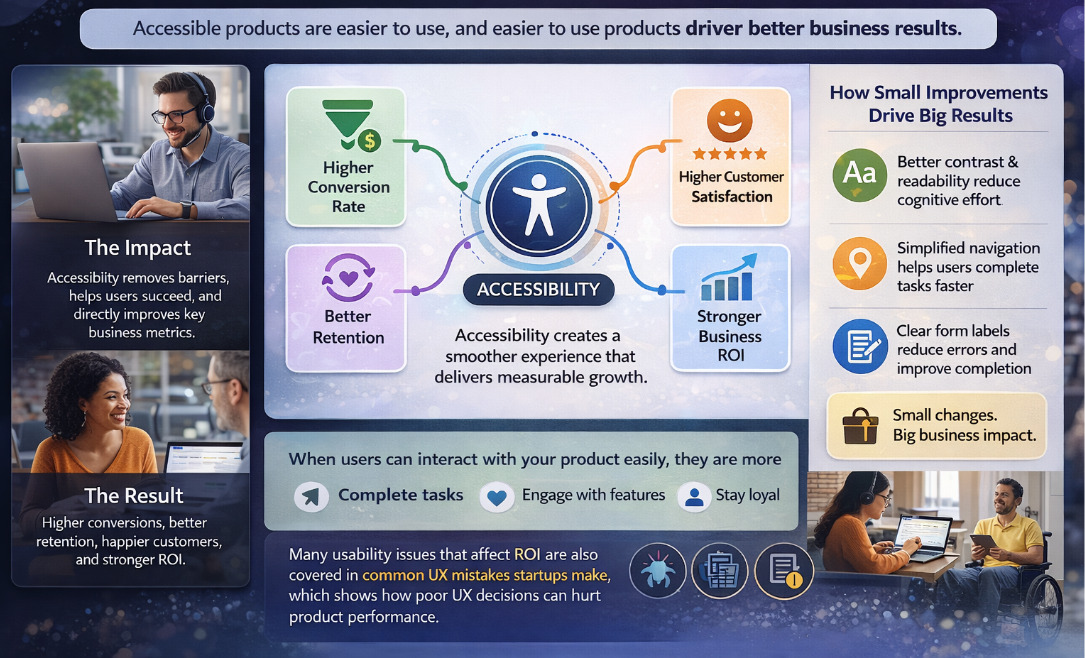
These improvements may seem small individually, but together they create a significant impact on business outcomes.
Many usability issues that affect ROI are also covered in common UX mistakes startups make, which highlights how poor UX decisions can negatively affect product performance.
Expanding User Reach Through Inclusive Design
One of the biggest advantages of accessibility is increased user reach. When a product is designed inclusively, it becomes usable by a wider audience. This includes users with disabilities as well as users in different environments and contexts.
By ignoring accessibility, organizations unintentionally exclude a portion of their audience. This not only limits growth but also affects brand perception.
On the other hand, inclusive design ensures that more users can interact with the product effectively. This leads to higher engagement and better customer satisfaction.
In competitive markets, accessibility can become a key differentiator.
Core Principles of Accessibility in UX
Perceivable Content
Users must be able to perceive information regardless of their abilities. This includes providing text alternatives for images, ensuring proper color contrast, and using readable typography.
Operable Interfaces
Users should be able to navigate and interact with the interface using different input methods. This includes keyboard navigation and assistive technologies.
Understandable Design
Content and interactions should be clear and predictable. Users should not have to guess how to complete tasks.
Robust Implementation
Interfaces should work reliably across different devices, browsers, and assistive technologies.
Accessibility and Usability: A Strong Relationship
Accessibility and usability are closely connected. Improvements in accessibility often lead to better usability for all users.
For example, clear navigation helps users find information quickly. Better contrast improves readability. Simplified layouts reduce cognitive load.
This relationship makes accessibility an essential part of any UX strategy. It is not a separate process but an integrated component of design.
In practical scenarios, even small accessibility improvements such as better contrast or clearer labels can significantly improve user engagement.
Common Accessibility Issues in Digital Products
Many digital products fail to meet basic accessibility standards. Common issues include:
- Poor color contrast making text difficult to read
- Missing alt text for images
- Complex navigation structures
- Unclear form labels
- Lack of keyboard accessibility
These issues not only affect users with disabilities but also reduce overall usability.
Integrating Accessibility into UX Process
Accessibility should be integrated into every stage of the UX process rather than added at the end. This ensures that inclusive design becomes a core part of product development.
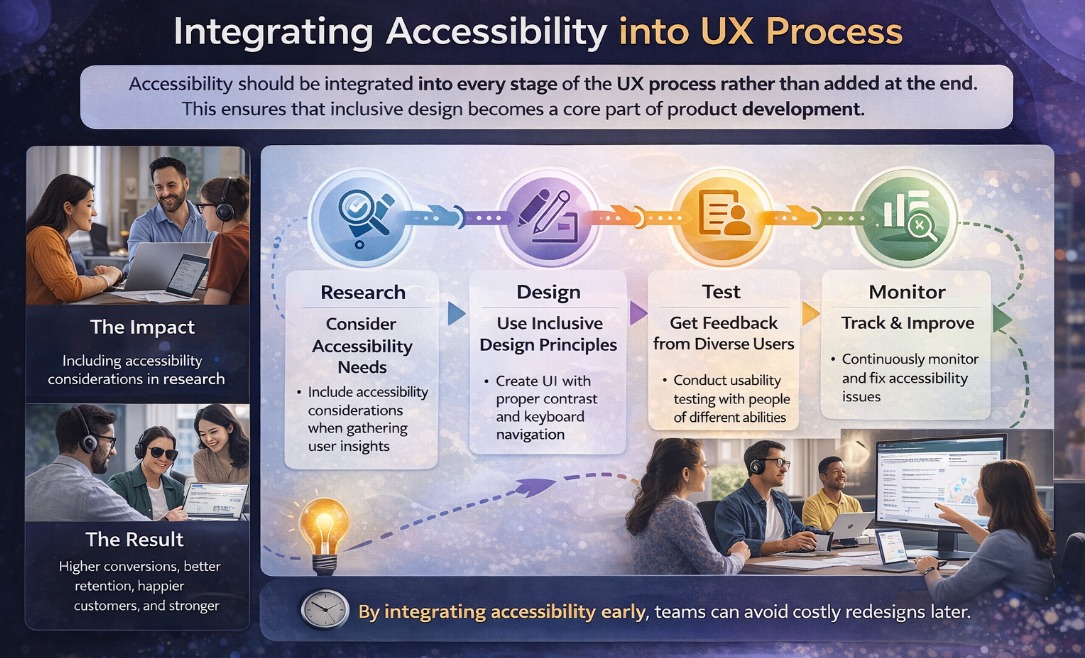
A structured UX process for SaaS products helps teams incorporate accessibility from the beginning.
Key steps include:
- Including accessibility considerations in research
- Designing interfaces with inclusive principles
- Testing with diverse users
- Continuously monitoring accessibility performance
By integrating accessibility early, teams can avoid costly redesigns later.
Real Example: Accessibility Driving Business Growth
In a SaaS product, users struggled with form completion due to poor readability and unclear labels. This resulted in low conversion rates and high drop-offs.
After implementing accessibility improvements such as better contrast, clearer labels, and simplified layouts, the platform saw significant improvements:
- Form completion rates increased
- User engagement improved
- Support requests decreased
This example demonstrates how accessibility directly contributes to business growth.
Tools for Accessibility Testing
Several tools help teams evaluate accessibility:
- WAVE for accessibility evaluation
- Axe for automated testing
- Lighthouse for performance and accessibility insights
Explore more tools in UX tools and process guide.
Advanced Accessibility Strategy
Advanced teams go beyond compliance and integrate accessibility into business strategy. They measure the impact of accessibility improvements on user behavior and business metrics.
This includes:
- Continuous accessibility audits
- Data-driven improvements
- Collaboration between design and development teams
As a result, accessibility becomes a driver of innovation rather than a constraint.
The Future of Accessibility in UX
Accessibility is evolving with technology. AI-driven tools are enabling real-time accessibility improvements, while adaptive interfaces provide personalized experiences.
As digital products continue to grow, accessibility will become a key differentiator in user experience and business success.
Real Accessibility Issues and Their Business Impact
- Issue: Poor contrast making content hard to read
- Impact: Increased bounce rate and lower engagement
- Issue: Complex forms with unclear labels
- Impact: Lower conversion and higher drop-offs
- Issue: Lack of keyboard accessibility
- Impact: Reduced usability for a segment of users
Key Insight
Accessibility is not just about making products usable for more people; it is about making products work better for everyone. When usability improves, business metrics naturally follow.
Conclusion
Accessibility is not just a design requirement—it is a business strategy. By creating inclusive experiences, organizations can improve usability, expand their audience, and drive measurable growth.
Ultimately, accessibility ensures that digital products are usable, scalable, and aligned with the needs of all users.