

Why B2B Portal UX Is Different from B2C
B2B portals are fundamentally different from consumer-facing products. While B2C products focus on simplicity and quick interactions, B2B platforms are designed for complex workflows, multiple stakeholders, and business-critical tasks. Because of this, designing an effective B2B portal UX strategy requires a completely different approach.
In most B2B environments, users are not casual visitors. They are professionals using the platform to complete specific tasks such as managing orders, tracking inventory, analyzing reports, or coordinating with teams. Therefore, usability issues in B2B portals directly impact productivity and business outcomes.
Many organizations invest heavily in features but overlook user experience. As a result, portals become cluttered, difficult to navigate, and inefficient. This leads to low adoption, increased training costs, and frequent support requests.
Before defining a strategy, it is essential to evaluate existing usability gaps. A structured UX audit framework can help identify key issues. You can also refer to a UX audit checklist to quickly assess usability challenges.
In real B2B platforms, UX challenges are not just about design but about managing complex workflows, multiple user roles, and business-critical tasks. Unlike consumer products, efficiency and clarity matter more than visual appeal.
From My Experience
In one of my B2B portal projects, users from different roles such as admins, managers, and operators were using the same interface. This created confusion because each role required different information and actions.
We introduced role-based dashboards and simplified workflows based on user responsibilities. As a result, users were able to complete tasks more efficiently, and the overall experience became more structured.
This experience showed that B2B UX is less about visual design and more about aligning the interface with real business workflows.
Understanding the Complexity of B2B Portals
B2B portals typically include multiple modules such as dashboards, reporting systems, order management, and communication tools. Each module serves a different purpose and may have different user roles.
This complexity introduces several UX challenges:
- Multiple user roles with different permissions
- Complex workflows spanning multiple steps
- Large volumes of data and information
- Integration with external systems
Therefore, a strong UX strategy must focus on reducing complexity without removing functionality.
Why UX Strategy Is Critical for B2B Success
In B2B platforms, user experience directly affects productivity. If users struggle to complete tasks, it slows down operations and impacts business efficiency.
A well-designed UX strategy delivers measurable benefits:
- Reduced task completion time
- Higher user adoption rates
- Lower training and onboarding costs
- Fewer support requests
Many usability issues found in B2B platforms are also discussed in common UX mistakes startups make. Avoiding these mistakes is essential for building effective portals.
Key Principles of B2B Portal UX Strategy
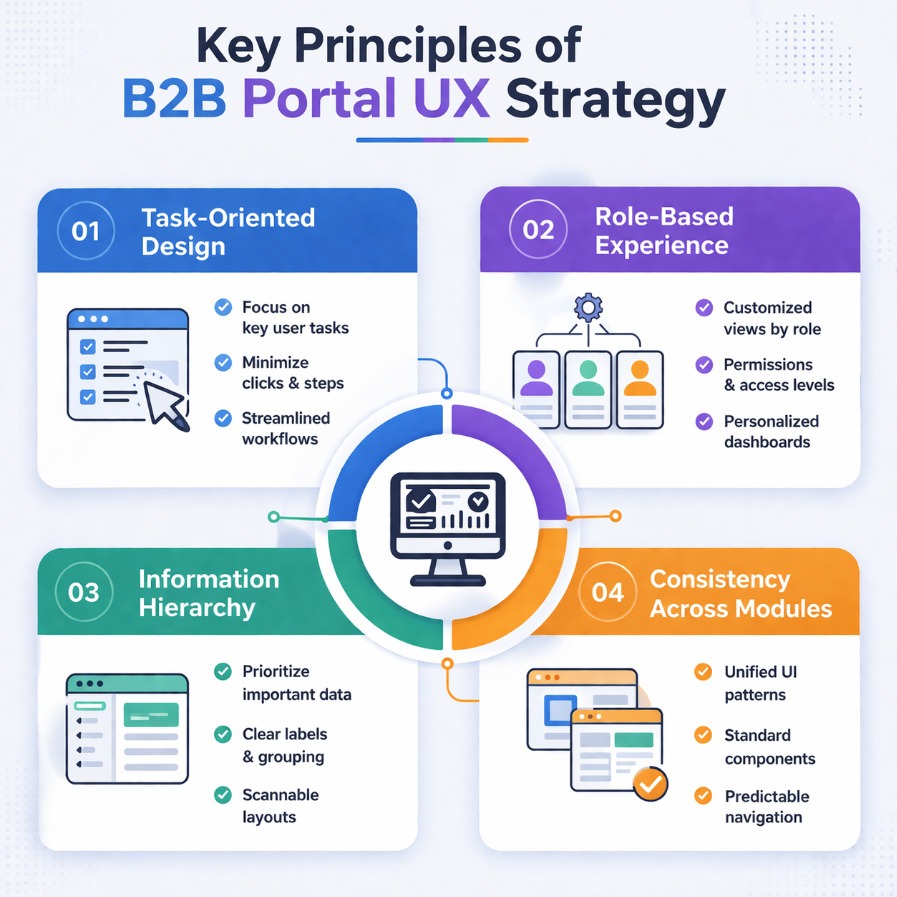
1. Task-Oriented Design
B2B users are goal-driven. They visit the platform to complete specific tasks. Therefore, the interface should prioritize task completion over visual aesthetics.
For example, instead of focusing on decorative UI elements, the design should highlight key actions such as creating orders, generating reports, or updating data.
2. Role-Based Experience
B2B portals often have multiple user roles such as administrators, managers, and operators. Each role has different needs and permissions.
A strong UX strategy ensures that users see only relevant information. This reduces cognitive load and improves efficiency.
3. Information Hierarchy
Clear information hierarchy is critical in B2B platforms. Users should be able to quickly identify important data and actions.
Grouping related information and using visual hierarchy improves readability and usability.
4. Consistency Across Modules
B2B portals often include multiple modules. Consistency in design patterns, navigation, and interactions ensures a seamless experience.
Following established design systems such as Material Design helps maintain consistency.
Real Implementation: B2B Portal UX Strategy in Action
In a real-world B2B portal project, users faced significant challenges in managing orders and tracking performance. The platform included multiple modules, but navigation was unclear, and workflows were inefficient.
Through a structured UX strategy, several improvements were implemented:
- Simplified navigation by grouping related features
- Introduced role-based dashboards
- Reduced steps in key workflows
- Improved data visualization for better insights
As a result:
- Task completion time reduced by 40%
- User satisfaction improved significantly
- Support requests decreased
This example highlights how a well-defined UX strategy can transform complex systems into efficient tools.
Designing Efficient Workflows in B2B Portals
Workflows are the backbone of B2B platforms. Poorly designed workflows lead to inefficiency and frustration.
To optimize workflows:
- Minimize the number of steps required
- Provide clear guidance at each stage
- Use progressive disclosure to avoid overwhelming users
Analyzing workflows using a UX process for SaaS products can help improve efficiency.
In real-world B2B systems, even small inefficiencies in workflows can significantly impact productivity across teams.
Data Visualization and Dashboard Design
B2B portals often deal with large volumes of data. Effective data visualization helps users make informed decisions quickly.

Best practices include:
- Using charts and graphs for clarity
- Highlighting key metrics
- Avoiding information overload
Following accessibility standards such as WCAG guidelines ensures readability for all users.
Common UX Challenges in B2B Portals
- Overloaded dashboards with too much information
- Complex navigation structures
- Lack of role-based personalization
- Inconsistent UI patterns
Addressing these challenges requires continuous evaluation and improvement.
Tools Supporting B2B UX Strategy
- Figma for interface design
- Maze for usability testing
- Hotjar for behavior tracking
- Google Analytics for performance insights
Explore more tools in UX tools and process guide.
Advanced UX Strategy for B2B Platforms
Advanced teams go beyond basic usability improvements. They integrate UX with business strategy to drive measurable outcomes.
This includes:
- Data-driven decision making
- Continuous user feedback loops
- Cross-functional collaboration
As a result, UX becomes a strategic advantage rather than a design function.
Future of B2B UX Strategy
The future of B2B UX lies in personalization and automation. AI-driven systems can adapt interfaces based on user behavior and preferences.
This allows users to complete tasks more efficiently and improves overall productivity.
Common B2B UX Challenges and How to Solve Them
- Problem: Multiple user roles causing confusion
- Solution: Designing role-based interfaces and dashboards
- Problem: Complex workflows slowing down productivity
- Solution: Simplifying task flows and reducing steps
- Problem: Overloaded dashboards with too much data
- Solution: Prioritizing key information and improving layout
Key Insight
In B2B platforms, the success of UX is measured by efficiency, not aesthetics. The best interfaces are the ones that help users complete complex tasks quickly and with minimal effort.
Conclusion
A strong B2B portal UX strategy is essential for managing complexity and improving efficiency. By focusing on user needs, workflows, and data clarity, organizations can build platforms that deliver real business value.
Ultimately, a well-designed UX strategy improves productivity, reduces friction, and ensures long-term success.